Weather Station Backup
One project I’ve been wanting to work on for quite some time is self-hosting an IoT sensor and event logging platform. As a first step down this path, this project documents the process of logging the data from my personal weather station, rather than relying on forwarding the data to Weather Underground or Ambient Weather for viewing historical data.
Background
My weather station hardware consists of a WS-1401 weather station (wind speed, direction, temperature, humidity, solar intensity, and precipitation) and an OBSERVER-IP bridge which takes the readings from the weather station and forwards them to Weather Underground and/or Ambient Weather Network.
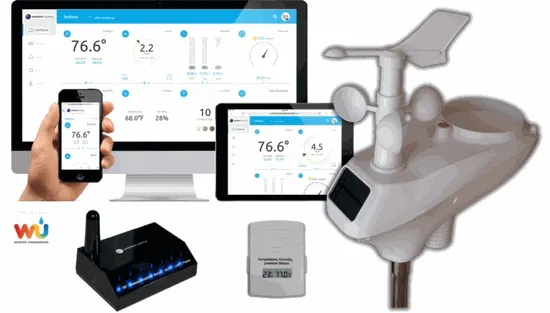
The goals for this project were to:
- Store the full rate (once per minute) data from the WS-1401
- Back up the data automatically to an s3-compatible store
- Hook the data up to Grafana and build a dashboard
Approach
To accomplish this, I decided to host a few different services on a Linode Nanode I was already paying $5/mo. for that had some spare capacity.
- A weather data scraping service in a docker container that would use the Ambient Realtime API based on Websockets. The standard Ambient Weather REST API only shows data at 5m granularity, whereas the Realtime API provides the updates as they are posted from the OBSERVER IP.
- A Grafana docker container that will show the data in case Weather Underground gets hit by a bus.
- A SQLite database to store the updates that will be shared between the scraping service and Grafana.
- A simple program to copy the SQLite database to Backblaze B2 for backup.
Weather Data Scraping Service
This simple docker container consists python program (could be Go someday) that uses socketio to connect to the Ambient Realtime API. Ambient Weather Network allows free users to create API and Application keys for free, which must be provided to the Realtime API. Pretty much the only gotcha I encountered here was the 1 request per second rate limiting on the API which wasn’t hard to hit in back to back tests. Socket callbacks come back, and the data is inserted into a sqlite3 database.
Grafana
The interesting challenges here were all around SQLite integration with Grafana features. SQLite integration is provided via the plugin which does have notable limitations. Grafana wants to work in unix time, so while my logging code originally used SQL datetime for the timestamp field, moving to integer seconds since the epoch in UTC simplified things dramatically. Supporting the Grafana time range filtering was then handled via code like this:
SELECT
  $__unixEpochGroupSeconds(timestamp, $interval_seconds, NULL) as time,
  AVG(pressure_relative) as 'Relative',
  AVG(pressure_absolute) as 'Absolute'
FROM weather_measurements
WHERE timestamp >= $__from/1000 AND timestamp < $__to/1000
GROUP BY 1
ORDER BY 1
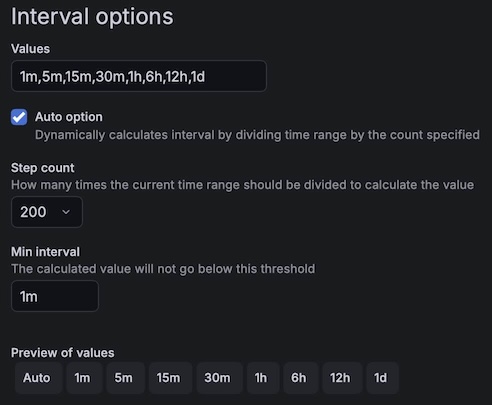
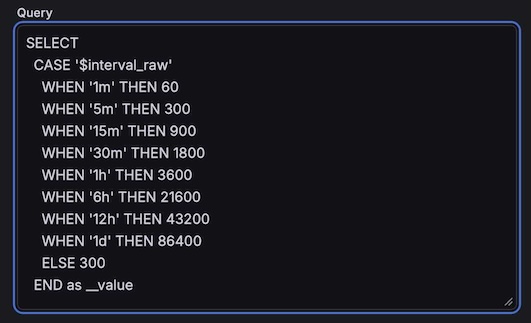
Note also that the standard Grafana __timeGroup() function for controlling data aggregation does not work in the SQLite plugin, $__interval is a string like 5m, and $__interval_ms cannot be used in the $__unixEpochGroupSeconds() macro since the string $__interval_ms / 1000 is passed as a string rather than being evaluated. So, the workaround for this is to define two dashboard-level Grafana variables.
An interval-type, which handles the auto-scaling duration
A query-type which converts the auto-scaled duration from a string to an integer for use by SQLite
This ends up expanding like this at the top left of the dashboard, and the $interval_seconds in the grouping macro picks up the integer value. 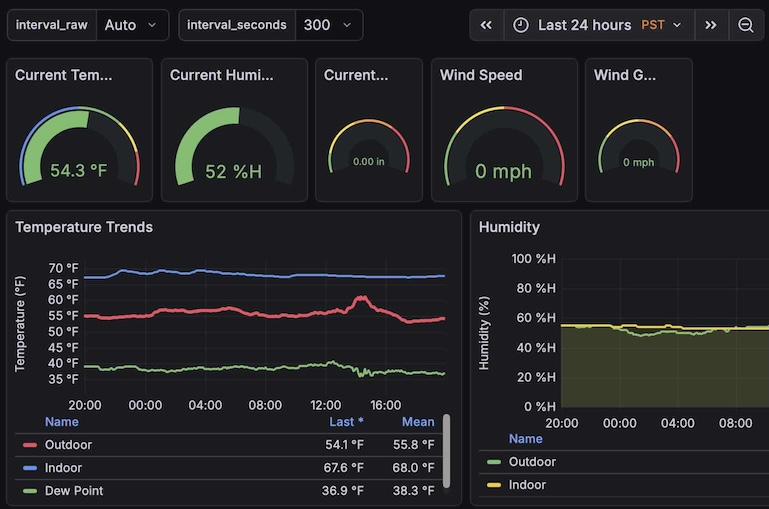
Backup Service
Backblaze B2 is an s3-compatible cloud storage platform that offers the first 10GB of stored data for free, which at about 400KB per day should be good for quite some time. I’m was already a happy Backblaze customer of their personal computer backup solution, so this was a pretty easy call. The code in this docker container is a simple python program using the s3 APIs to copy the SQLite database up every day at 2am, and to keep the last 45 days of daily backups and then one per month after that indefinitely.
Alternatives
I did consider running something locally on a mac in my house, but preferred something running on Linode that would be up more or less 24/7 since I’ve had less than great success in keeping all my home computers up and not sleeping. This would allow me to directly slurp the data from the Observer IP’s local http server, but ultimately decided against this since I also want this project to build some of the building blocks of a larger IoT sensor platform for future projects.